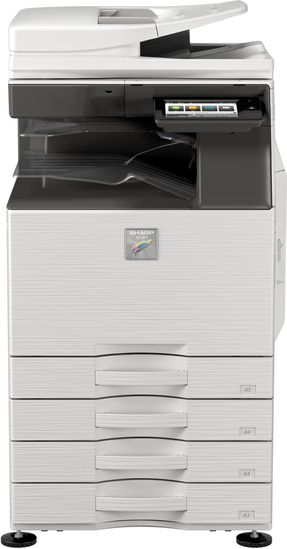
- The Sharp MX-3070N prints fast, up to 60 pages per minute for A4 and 30 pages per minute for A3 papers. It has a high resolution of up to 9,600 dpi for clear images.
- This printer can hold a lot of paper, starting with 650 sheets and expanding up to 6,300 sheets. It handles many sizes and weights of paper.
- It’s great for offices because it can print, copy, scan, fax, and file documents. You can connect it to a network or use it wirelessly.
- The machine starts quickly, making its first copy in just a few seconds. It also saves energy with only up to 1.65 kW used.
- Customers like the touchscreen that makes it easy to control the printer. They praise its speed and the quality of prints but note setup can be tricky.
The Sharp MX-3070N speeds through work at 30 pages per minute, making both color and black-and-white documents look sharp. It handles many paper sizes, from small notes to big charts, so all your printing needs are covered.
Printing speed and resolution
The Sharp MX-3070N prints quickly. For standard size papers (A4), it can go up to 60 pages per minute (ppm). With larger papers (A3), it still performs well at 28 ppm, and even the widest papers (A3W) are printed at 26 ppm.
Its images are also sharp, with a resolution of 600 dots per inch (dpi). However, with certain settings, this can appear as high as 9,600 dpi.
This printer is great for big tasks that need to start fast. Making its first copy takes only a few seconds – as quick as 3.5 for some models. This means less waiting time and more work done, whether it’s printing a business report or a high-quality color flyer.
Plus, its paper handling is efficient; whether the job is big or small, it runs smoothly without jams or delays.
Paper capacity and handling
The Sharp MX-3070N comes initially equipped with a 650-sheet paper capacity, divided between a 550-sheet tray and an independent 100-sheet multi-purpose tray. Should you require more room, its capacity can be increased to encompass up to 6,300 sheets.
This printer supports an expansive variety of paper sizes, from the larger A3W (12″ x 18″) sheets to smaller A5 (5 1/2″ x 8 1/2″) ones. The trays can accommodate a range of paper weights, managing anything from light 60 g/m² paper in the chief tray to dense cardstock at 300 g/m².
With such adaptability, it becomes a prime selection for offices with varied printing requirements like routine reports on standard paper and high-end brochures on denser cover stock, minus the inconvenience of recurrent refills.
Moreover, its sorting and stapling abilities assure that the documents are well-ordered and prepared directly from the printer.
The Sharp MX-3070N comes packed with tools to make your work easy. It lets you print, copy, scan, send faxes, and file documents—all in one place. You can connect it to a network or use it wirelessly.
This means everyone in the office can share it without cables getting in the way.
Print, Copy, Scan, Fax, File
This machine is a powerhouse. It prints, copies, scans, faxes, and manages files without breaking a sweat. You can churn out up to 9,999 copies at one time. The scanning quality is crystal clear with 600 x 600 dots per inch resolution.
Want to zoom in or out? You have a range from 25% all the way up to an impressive 400%. Plus, it’s speedy – scanning up to 80 pages a minute. Sending faxes? Quick as lightning, less than three seconds.
It’s also great with online stuff and wireless gadgets for easy file sharing and saving your work on the internet. Emailing documents or dropping them into cloud storage like Microsoft Office is super straightforward.
Making PDFs you can search through later makes finding things a breeze. It also handles different types of files which means you can keep working smoothly and stay productive.
Network-Ready and Wireless Capabilities
The Sharp MX-3070N printer makes connecting and printing from anywhere simple. It offers USB 2.0 and Ethernet options for quick network connections. Compatible with both Windows and Mac OS, it’s versatile for nearly any computer setup.
For online or email-based printing, it supports various protocols including TCP/IP, LPR, Raw TCP, POP3, HTTP, FTP, IPP, SMB.
Wireless printing is also an option with this device. If you want to print a document from your phone – that’s easy to do. The printer can link up with cloud storage platforms as well, allowing you to access files directly from services like Dropbox via its touchscreen interface.
With the ability to process documents in PCL 6 and Adobe PostScript 3 formats, handling different types of files is a breeze.
The Sharp MX-3070N loves busy offices. If your team tackles lots of high-quality color projects, this printer steps up.
Suitable for medium workgroups
This printer is great for small teams. It can handle a lot of papers and prints quickly, so you won’t have to wait long. It’s ready to go in seconds, making the first copy in just 4.5 seconds and warming up in 14 seconds.
With 5 GB of memory, it keeps running smoothly even with many jobs lined up.
It also simplifies things by connecting to networks and going wireless. You can easily print from your phone or use cloud storage services without any hassle. The scanner is user-friendly thanks to tabs, making it easy to navigate through options.
Plus, it’s energy-efficient, using only up to 1.65 kW, which helps keep power bills low. For offices that need crisp color documents and value time savings, this printer is a good choice.
Optimal for businesses with high-quality color output needs
Medium-sized workgroups and companies in need of superior color prints will find this printer a perfect match. It produces crisp, lively images with a high printing resolution of 9,600 x 600 dots per inch.
The printer is compatible with numerous file types like TIFF, PDFs – both rich text and searchable – JPEG, and others, simplifying document management for businesses.
This model does more than just printing—it scans directly to emails or desktops, FTP servers or network folders (SMB), as well as USB drives or HDDs. Its document filing system houses up to 20,000 pages or 3,000 files.
This feature increases productivity by ensuring essential documents are at your fingertips. Moreover, its power-saving traits lower costs while maintaining quality output—perfect for environmentally conscious workplaces.
Customers share their thoughts on the Sharp MX-3070N. They talk about how it makes work easier and its performance in busy offices.
User experiences and satisfaction
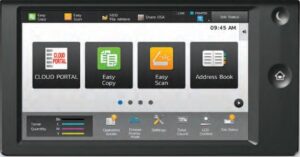
People who use the Sharp MX-3070N enjoy its touchscreen. It’s easy to use with a large 10.1-inch color LCD screen, making the device user-friendly. Users appreciate the fast printing and scanning speeds.
The printer can scan at 80 pages per minute and prints clear images at 600 x 600 dpi.
Many users also like that this printer can hold up to 6,300 sheets of paper, so they don’t have to refill it often. It’s perfect for medium-sized teams because of this capacity and its ability to quickly create sharp, searchable PDFs.
Some people have added a fax option, which has made office work more efficient.
Common praises and critiques
People really like the Sharp MX-3070N for its quick printing, which can go up to 60 pages a minute. They enjoy the high-quality color prints that make documents look sharp and professional.
The 10.1-inch touchscreen is a hit because it’s easy to use, letting them complete tasks quickly with just a few taps. With a paper capacity of up to 6,300 sheets, this printer is great for large projects.
However, some find setting it up challenging, especially when dealing with certain network settings. Its longer warm-up time might be a problem for those who need things done fast.
But even with these issues, the Sharp MX-3070N shines in office environments where top-notch color and ease of use are key.
The Sharp MX-3070N is a big help for busy offices. It prints fast and clear, handles lots of paper, and can do many tasks like copying, scanning, and sending faxes. This printer connects to networks easily and works without wires too.
It’s great for teams that need to print lots of high-quality color documents. MyAmeritex offers this powerful machine plus more tools if you need them.
Finding the right printer can be tough. Everyone wants a device that does it all—print, copy, scan, fax—and doesn’t jam every five minutes. The Sharp MX-C304WH is a star in this world of printers and copiers.
It’s fast and reliable. This machine prints 30 pages per minute. That’s both black-and-white and color prints at top speed! Our article shows you why the Sharp MX-C304WH might solve your office problems. You’ll learn about its paper capacity, print quality, and how easy it is to use.
Let’s get started….
Key Takeaways
- The Sharp MX-C304WH is a fast and reliable printer that can print, copy, scan, fax, and manage files at 30 pages per minute for both black-and-white and color documents.
- It has a high paper capacity of up to 2,700 sheets and prints with clear quality at 600 x 600 dpi resolution.
- The printer features a user-friendly 7-inch color LCD touchscreen and offers maintenance kits and toner cartridges to keep it running smoothly.
Key Features of Sharp MX-C304WH
The Sharp MX-C304WH packs a lot. It can print, copy, scan, fax, and manage files all in one machine. This means less clutter in your office and more getting things done. With a speed of 30 pages per minute for both black-and-white and color documents, waiting around for prints is a thing of the past.
Print, Copy, Scan, Fax, File
The Sharp MX-C304WH is a powerhouse, offering printing, copying, scanning, faxing, and file management all in one device. It’s quick too – it can print 30 pages per minute whether you’re working with black and white documents or color ones.
This multifunction printer simplifies tasks. It handles a variety of file formats including PDFs and TIFFs, so managing different types of documents is a breeze. Sending secure emails? Absolutely doable.
Need to turn a scan into a searchable PDF? No worries. Plus, it connects to networks using up-to-date protocols like SMB and lets you print from smartphones and tablets through Wi-Fi Direct.
Speed: 30 Pages Per Minute in both B/W and Color
After highlighting how this machine can print, copy, scan, fax, and file documents, it’s important to emphasize its speed. It can churn out 30 pages per minute whether you’re printing in black and white or color.
This rapid printing capability means you can complete your tasks quicker.
This printer leverages advanced technology like IPv6 and TCP/IP for top performance in busy settings. With a high-speed output of 30 pages per minute, it reduces wait times significantly.
This efficiency boost allows for more productivity in less time. Sharp designed this printer with the modern fast-paced environment in mind.
Advanced Specifications
The Sharp MX-C304WH packs a punch with its high paper capacity and detailed print quality. It can hold up to 2,700 sheets, making big jobs easy, and delivers clear documents at 600 x 600 dots for every inch.
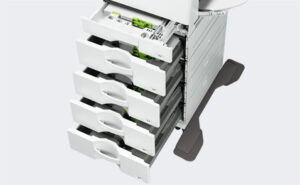
Maximum paper capacity: 2,700 sheets
The Sharp MX-C304WH is a standout because it can hold up to 2,700 sheets of paper. This large capacity means less frequent refills, perfect for busy offices. It accepts various paper sizes and types, streamlining your tasks.
This printer also saves time. With its ample paper storage, you can concentrate on other work without worrying about the printer’s status. Plus, being from Sharp, a company recognized by Fortune as one of the Most Admired Companies in 2023, ensures reliability.
Print resolution: 600 x 600 dpi
The Sharp MX-C304WH makes your documents look sharp and clear. With a resolution of 600 x 600 dpi, every page comes out detailed. This means texts are easy to read and images look smooth.
Your printed files, such as PDFs and Word docs, will appear just the way you want.
This printer handles various paper sizes up to 2,700 sheets at once. You can print big jobs without stopping to refill it. It supports many file types too — from emails and PDF formats to rich text files in Google Drive or OneDrive for Business.
Its high resolution ensures that even complicated graphics in PowerPoint slides or Excel charts are crisp and easy to understand.
Usability Enhancements
Making the Sharp MX-C304WH easy to use was a big goal. It has a 7-inch color touch screen. This screen is like a tablet and makes picking your tasks simple.
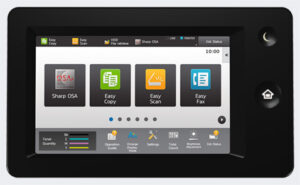
7-inch color LCD touchscreen with Easy UI mode
This Sharp printer features a bright 7-inch color LCD touchscreen. It simplifies operation, allowing you to easily select icons, much like using your smartphone, but for printing, scanning, faxing, and more.
Sharp earned recognition as one of Fortune’s Most Admired Companies in 2023. This honor reflects their commitment to quality products such as this printer with its Easy UI mode. The mode streamlines tasks, helping you avoid the confusion of numerous buttons or complex menus.
Additional Support Options
Keep your Sharp MX-C304WH running smoothly with extra help like care kits and color powders. Check out more on this!
Maintenance Kits
Maintenance kits for the Sharp MX-C304WH are here to make things easier. These kits come with everything needed to keep your printer in top shape. From toners that make colors pop on each page, to drums ensuring crisp prints, these kits cover it all.
With them, you won’t have to stress about running low on supplies or sudden printer issues.
They’re a smart pick for any office. Think of these maintenance kits as a health pack for your printer. They prevent paper jams and other problems that can slow down work. Plus, using them means you’re less likely to need repairs later on.
This saves time and money, helping your business run smoothly without stops.
Toner Cartridges
After discussing maintenance kits, let’s talk about toner cartridges. The Sharp MX-C304WH offers various toner cartridges, crucial for producing clear documents and bright colors. You can print a high number of pages before needing a replacement.
This saves time and keeps your work flow smooth.
Sharp is recognized for its quality. In 2023, it was praised as one of Fortune’s Most Admired Companies. This recognition reflects in their printer products like the MX-C304WH, and extends to their toners as well.
They are long-lasting and ensure every print looks excellent. With these toners, tackling any project becomes easy.
FAQs
1. What operating systems does the Sharp MX-C304WH support?
The Sharp MX-C304WH multifunctional device supports a range of operating systems including Windows 10, Windows 8.1, and Windows 7.
2. Can I print from my mobile on the Sharp MX-C304WH printer?
Yes, indeed! The Sharp MX-C304WH supports mobile printing technologies for ease of use. You can print directly from your smartphone or tablet via supported apps.
3. Does the Sharp MX-C304WH offer any security features?
Certainly! The Sharp MX-C304WH incorporates several cybersecurity measures such as WPA2 and WPA3 protocols, IPsec and TLS encryption methods for secure data transmission over network protocols like HTTPS and FTPS.
4. Is internet faxing possible with this model?
Sure thing! With this color printer’s iFax feature, you can send internet faxes easily by using SMTP or POP3 mail services like Gmail.
5. How user-friendly is the interface of this multifunctional device?
The graphical interface of the Sharp MX-C304WH is designed with users in mind – it’s intuitive layout makes navigating through its functions a breeze… even when scanning to PDF files or sending an e-mail!
6. Can I save my documents to USB drives using this printer?
Absolutely! Whether it’s a USB stick or thumb drive, you can conveniently store scanned Adobe PDFs directly onto your USB memory stick thanks to Qualcomm DirectOffice technology integrated into this MFP.
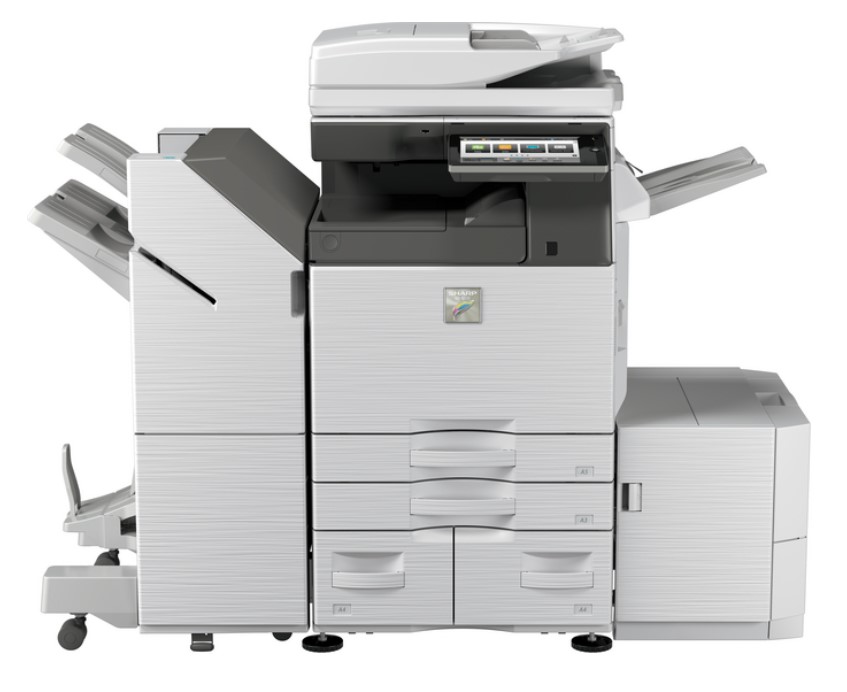
If you need a multifunction printer that is loaded with features, but worry about its cost, a refurbished, certified preowned Sharp MX-3070N A3 Color Laser Multifunction Printer might be what you need.
It prints fast and clear.
This printer has a big screen to make it easy to use. You can print a lot of pages without stopping to add more paper. Our blog will show you why this printer is great for your office or workgroup.
Keep reading to find out how it makes printing easy and fast.
Key Takeaways
- The Sharp MX-3070N prints fast, up to 60 pages per minute for A4 and 30 pages per minute for A3 papers. It has a high resolution of up to 9,600 dpi for clear images.
- This printer can hold a lot of paper, starting with 650 sheets and expanding up to 6,300 sheets. It handles many sizes and weights of paper.
- It’s great for offices because it can print, copy, scan, fax, and file documents. You can connect it to a network or use it wirelessly.
- The machine starts quickly, making its first copy in just a few seconds. It also saves energy with only up to 1.65 kW used.
- Customers like the touchscreen that makes it easy to control the printer. They praise its speed and the quality of prints but note setup can be tricky.
Sharp MX-3070N Product Specifications
The Sharp MX-3070N speeds through work at 30 pages per minute, making both color and black-and-white documents look sharp. It handles many paper sizes, from small notes to big charts, so all your printing needs are covered.
Printing speed and resolution
The Sharp MX-3070N prints quickly. For standard size papers (A4), it can go up to 60 pages per minute (ppm). With larger papers (A3), it still performs well at 28 ppm, and even the widest papers (A3W) are printed at 26 ppm.
Its images are also sharp, with a resolution of 600 dots per inch (dpi). However, with certain settings, this can appear as high as 9,600 dpi.
This printer is great for big tasks that need to start fast. Making its first copy takes only a few seconds – as quick as 3.5 for some models. This means less waiting time and more work done, whether it’s printing a business report or a high-quality color flyer.
Plus, its paper handling is efficient; whether the job is big or small, it runs smoothly without jams or delays.
Paper capacity and handling
The Sharp MX-3070N comes initially equipped with a 650-sheet paper capacity, divided between a 550-sheet tray and an independent 100-sheet multi-purpose tray. Should you require more room, its capacity can be increased to encompass up to 6,300 sheets.
This printer supports an expansive variety of paper sizes, from the larger A3W (12″ x 18″) sheets to smaller A5 (5 1/2″ x 8 1/2″) ones. The trays can accommodate a range of paper weights, managing anything from light 60 g/m² paper in the chief tray to dense cardstock at 300 g/m².
With such adaptability, it becomes a prime selection for offices with varied printing requirements like routine reports on standard paper and high-end brochures on denser cover stock, minus the inconvenience of recurrent refills.
Moreover, its sorting and stapling abilities assure that the documents are well-ordered and prepared directly from the printer.
Key Features and Functionality
The Sharp MX-3070N comes packed with tools to make your work easy. It lets you print, copy, scan, send faxes, and file documents—all in one place. You can connect it to a network or use it wirelessly.
This means everyone in the office can share it without cables getting in the way.
Print, Copy, Scan, Fax, File
This machine is a powerhouse. It prints, copies, scans, faxes, and manages files without breaking a sweat. You can churn out up to 9,999 copies at one time. The scanning quality is crystal clear with 600 x 600 dots per inch resolution.
Want to zoom in or out? You have a range from 25% all the way up to an impressive 400%. Plus, it’s speedy – scanning up to 80 pages a minute. Sending faxes? Quick as lightning, less than three seconds.
It’s also great with online stuff and wireless gadgets for easy file sharing and saving your work on the internet. Emailing documents or dropping them into cloud storage like Microsoft Office is super straightforward.
Making PDFs you can search through later makes finding things a breeze. It also handles different types of files which means you can keep working smoothly and stay productive.
Network-Ready and Wireless Capabilities
The Sharp MX-3070N printer makes connecting and printing from anywhere simple. It offers USB 2.0 and Ethernet options for quick network connections. Compatible with both Windows and Mac OS, it’s versatile for nearly any computer setup.
For online or email-based printing, it supports various protocols including TCP/IP, LPR, Raw TCP, POP3, HTTP, FTP, IPP, SMB.
Wireless printing is also an option with this device. If you want to print a document from your phone – that’s easy to do. The printer can link up with cloud storage platforms as well, allowing you to access files directly from services like Dropbox via its touchscreen interface.
With the ability to process documents in PCL 6 and Adobe PostScript 3 formats, handling different types of files is a breeze.
Ideal Applications
The Sharp MX-3070N loves busy offices. If your team tackles lots of high-quality color projects, this printer steps up.
Suitable for medium workgroups
This printer is great for small teams. It can handle a lot of papers and prints quickly, so you won’t have to wait long. It’s ready to go in seconds, making the first copy in just 4.5 seconds and warming up in 14 seconds.
With 5 GB of memory, it keeps running smoothly even with many jobs lined up.
It also simplifies things by connecting to networks and going wireless. You can easily print from your phone or use cloud storage services without any hassle. The scanner is user-friendly thanks to tabs, making it easy to navigate through options.
Plus, it’s energy-efficient, using only up to 1.65 kW, which helps keep power bills low. For offices that need crisp color documents and value time savings, this printer is a good choice.
Optimal for businesses with high-quality color output needs
Medium-sized workgroups and companies in need of superior color prints will find this printer a perfect match. It produces crisp, lively images with a high printing resolution of 9,600 x 600 dots per inch.
The printer is compatible with numerous file types like TIFF, PDFs – both rich text and searchable – JPEG, and others, simplifying document management for businesses.
This model does more than just printing—it scans directly to emails or desktops, FTP servers or network folders (SMB), as well as USB drives or HDDs. Its document filing system houses up to 20,000 pages or 3,000 files.
This feature increases productivity by ensuring essential documents are at your fingertips. Moreover, its power-saving traits lower costs while maintaining quality output—perfect for environmentally conscious workplaces.
Customer Reviews and Feedback
Customers share their thoughts on the Sharp MX-3070N. They talk about how it makes work easier and its performance in busy offices.
User experiences and satisfaction
People who use the Sharp MX-3070N enjoy its touchscreen. It’s easy to use with a large 10.1-inch color LCD screen, making the device user-friendly. Users appreciate the fast printing and scanning speeds.
The printer can scan at 80 pages per minute and prints clear images at 600 x 600 dpi.
Many users also like that this printer can hold up to 6,300 sheets of paper, so they don’t have to refill it often. It’s perfect for medium-sized teams because of this capacity and its ability to quickly create sharp, searchable PDFs.
Some people have added a fax option, which has made office work more efficient.
Common praises and critiques
People really like the Sharp MX-3070N for its quick printing, which can go up to 60 pages a minute. They enjoy the high-quality color prints that make documents look sharp and professional.
The 10.1-inch touchscreen is a hit because it’s easy to use, letting them complete tasks quickly with just a few taps. With a paper capacity of up to 6,300 sheets, this printer is great for large projects.
However, some find setting it up challenging, especially when dealing with certain network settings. Its longer warm-up time might be a problem for those who need things done fast.
But even with these issues, the Sharp MX-3070N shines in office environments where top-notch color and ease of use are key.
Conclusion
The Sharp MX-3070N is a big help for busy offices. It prints fast and clear, handles lots of paper, and can do many tasks like copying, scanning, and sending faxes. This printer connects to networks easily and works without wires too.
It’s great for teams that need to print lots of high-quality color documents. MyAmeritex offers this powerful machine plus more tools if you need them.
FAQs
1. What is the Sharp MX-3070N A3 Color Laser Multifunction Printer?
The Sharp MX-3070N A3 is a color laser multifunction printer that can handle tasks such as printing, copying, and scanning in various file formats including PDF/A.
2. Does the Sharp MX-3070N A3 support e-mail or iFax functions?
Absolutely! This printer not only allows for sending scanned documents via e-mail but also supports iFax, which means you can send faxes over the internet instead of using a traditional phone line.
3. How does freight work when buying the Sharp MX-3070N A3?
When purchasing this printer, freight details will be handled by your chosen seller. Payment methods like PayPal are usually accepted making transactions convenient for buyers.
4. Is the Sharp MX-3070N energy efficient?
Yes indeed! The printer has an energy-saving feature designed to reduce power consumption while still providing high-quality prints even on tabloid-sized paper.